3 capabilities in the Microsoft Entra Workload Identities service are “ready now for production use

Microsoft Entra is an integrated family of multicloud identity and access solutions to secure access for the connected world. It unifies multicloud identity and access solutions into a comprehensive product family, so you can holistically solve secure access needs across your multifaceted digital landscape and the connected world.

Blue light emitting technique for windows 10 users

Blue Light Emitting   All our computer, mobile, television devices emit blue light, which really have a negative impact on our sleep.   Some mobiles do have the blue light filtering & Windows 10 has an inbuilt functionality to use warmer colors to prevent this issue.   How to Set Your Display for Night Time in … Read more

A user account was locked out Event ID 4740

The indicated user account was locked out after repeated logon failures due to a bad password. See event ID 4767 for account unlocked. This event is logged both for local SAM accounts and domain accounts. Example 4740 A user account was locked out. Subject:    Security ID:  SYSTEM    Account Name:  WIN-R9H529RIO4Y$    Account Domain:  WORKGROUP    Logon ID:  0x3e7 Account That Was … Read more

Sony begins withdrawing physical PS renewal cards worldwidePlus

Sony begins withdrawing physical PS renewal cards worldwidePlus Apparently, the company plans to sell them digitally only through the PS Store.   The fact that retail stores and online sites stopped selling PS Plus cards was first noticed by the authors of the Polish site XGP . Western publications, including VGC , also wrote about it later . Top-up cards … Read more

Let’s learn about Azure active directory domain services limitations

What is Azure Active Directory Domain Services Azure Active Directory Domain Services (Azure AD DS) provides managed domain services . It takes in domain join, group policy, lightweight directory access protocol (LDAP), and Kerberos/NTLM authentication. You use these domain services without the need to deploy, manage, and patch domain controllers (DCs) in the cloud.What is Azure … Read more

How To Backup and Restore Fully Automated Nagios(FAN Nagios) with Configuration and All.

Fully Automated Nagios

FAN Server Backup The fan-backup script is available if you want backup your FAN server. Install the fan-backup rpm : # yum install fan-backup To backup a FAN standonale, run # /opt/fan_backup.pl -s To get help, run : # /opt/fan_backup.pl –help FAN Server  Restore To restore a backup files, run : # cd /var/backup/XXXXXXXX_XXXXXX/ # … Read more

how to open ports using command prompt in windows 11

To open ports using the command prompt in Windows 11, you’ll need to use the Windows Defender Firewall with Advanced Security. Here’s a step-by-step guide on how to do this: Copynetsh advfirewall firewall add rule name=”Rule Name” dir=in action=allow protocol=TCP localport=PortNumber Let’s break this down: Copynetsh advfirewall firewall add rule name=”Open Port 80″ dir=in action=allow … Read more

Download the Windows 11 Security Book: Powerful security by Design

Here you can download the Free Windows 11 Security E-book Introduction: Emerging technologies and evolving business trends bring new opportunities andchallenges for organizations of all sizes. As technology and workstyles transform, so does the threat landscape with growing numbers of increasingly sophisticated attacks on organizations and employees. To thrive, organizations need security to work anywhere. … Read more

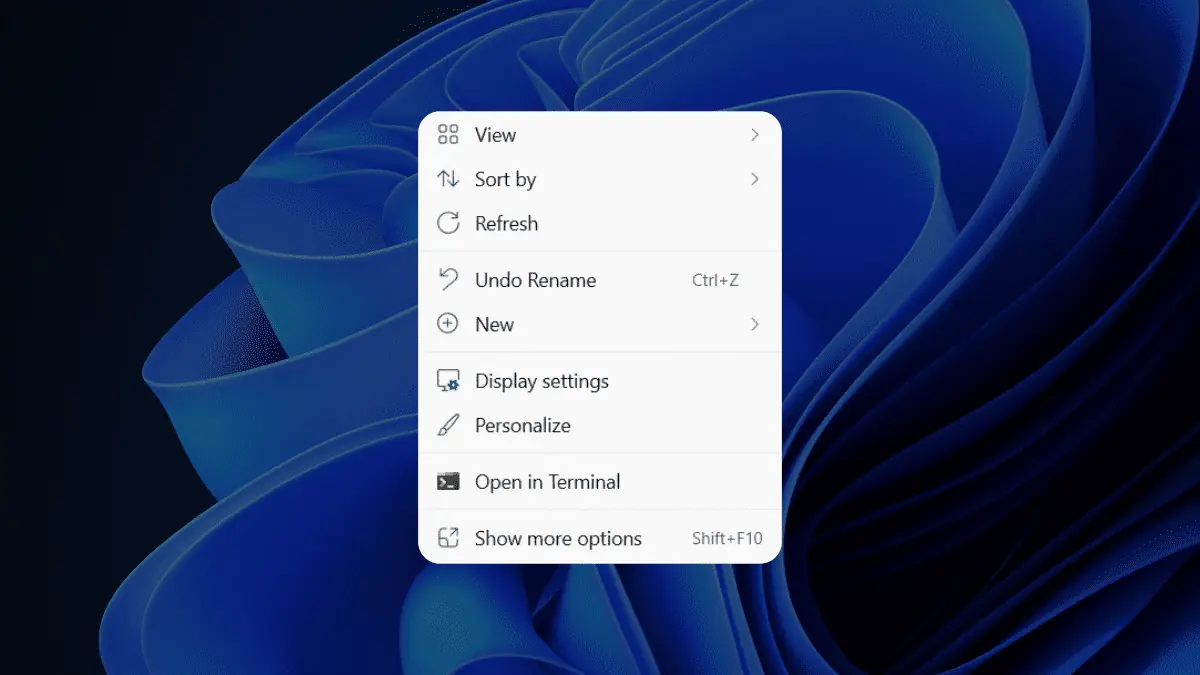
Right click options windows 11

right-click-new-context-menu-windows-11

right-click-new-context-menu-windows-11

Fully Automated Nagios: Host and service config issue

Fully Automated Nagios

Fully Automated Nagios,Host and service are not showing in monitoring view ?   You have to export your configuration,   go to Configuration > Monitoring Engines > Generate   Select a poller Check “Move Export Files” and “Restart Monitoring Engine” Click on Export   I have observed that, ” after any config change, we need to export it to take effect”.   Feel … Read more

Fully Automated Nagios Add Host Using Web Console

Fully Automated Nagios

  Fully Automated Nagios Monitoring platform is ready now to monitor your first servers or network equipment . It is simple to start monitoring.   First Step : Need to Login into Centreon Web Console With Administrative Credentials.   For Example:                        Username  : nagios … Read more

Ricosh default login

Access in the Administrator Mode Follow the procedure below to access Web Image Monitor in the administrator mode. Launch the Web browser. Enter the password, and then click [Login]. The default password is “password”. To ensure security, it is important you change the password. Multiple users cannot log onto the machine at the same time. If … Read more