
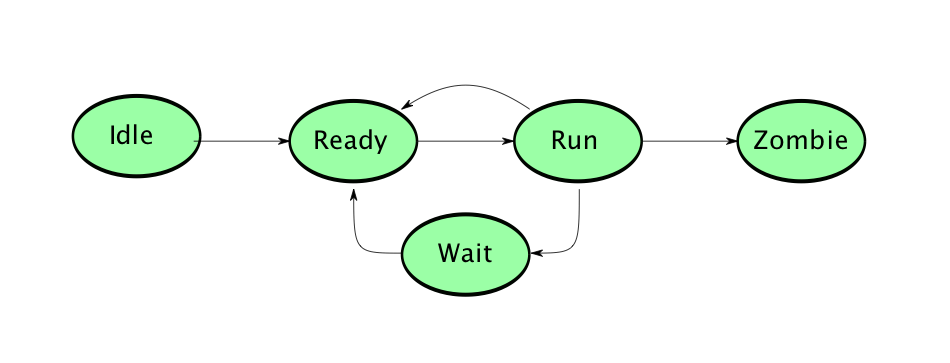
Source: http://www.cs.miami.edu
What are the Process States in Unix? A Comprehensive Guide
Introduction
In the Unix operating system, processes are fundamental units of execution that represent running programs. Understanding how these processes transition through different states during their lifecycle is crucial for system administrators, developers, and anyone working with Unix-based systems. Process states provide insights into system performance, help in troubleshooting issues, and enable efficient resource management.
Every process in Unix, from the moment it’s created until it terminates, passes through various states that reflect its current condition and relationship with system resources. These states determine whether a process is actively using the CPU, waiting for resources, or has completed its execution. This article explores the different process states in Unix, their characteristics, and how processes transition between these states.
[articlepage]
Understanding Unix Processes
Before diving into process states, it’s essential to understand what a process represents in Unix. A process is an instance of a program in execution, containing the program code, its current activity, and associated resources such as memory, file descriptors, and CPU registers. Each process has a unique Process ID (PID) that distinguishes it from other processes in the system.
Processes in Unix are created through system calls like fork() and exec(). The fork() system call creates a new process by duplicating the calling process, while exec() replaces the current process image with a new program. This parent-child relationship forms the basis of process management in Unix systems.
The kernel, which is the core component of the Unix operating system, manages these processes through a sophisticated scheduling mechanism. The process scheduler determines which process gets CPU time and when, based on various factors including process priority, resource requirements, and system policies.
[articlepage]
The Five Main Process States in Unix
Unix systems typically recognize five primary process states that represent the lifecycle of a process from creation to termination. These states form the foundation of process management and scheduling in Unix-based operating systems.
1. Running State (R)
The Running state indicates that a process is either currently executing on the CPU or is ready to run and waiting in the run queue. In multi-processor systems, multiple processes can be in the running state simultaneously, with each processor executing one process. However, in single-processor systems, only one process can truly be running at any given moment.
When a process is in the Running state, it has been selected by the scheduler and allocated CPU time. The process actively executes its instructions, performs calculations, and progresses through its code. The time a process spends in this state is called CPU time or execution time.
Processes in the Running state can be preempted by the scheduler if their time quantum expires or if a higher-priority process becomes available. This preemption ensures fair distribution of CPU resources among all processes and maintains system responsiveness.
[articlepage]
2. Sleeping/Waiting State (S)
The Sleeping or Waiting state represents processes that are waiting for some event to occur or a resource to become available. This is one of the most common states for processes in a Unix system, as processes frequently need to wait for input/output operations, user input, or synchronization with other processes.
There are two types of sleep states in Unix systems. Interruptible sleep (S) allows the process to be awakened by signals, making it responsive to system events or user interventions. Uninterruptible sleep (D), also known as disk sleep, occurs when a process is waiting for I/O operations that cannot be interrupted, typically involving disk or network operations.
Processes enter the Sleeping state voluntarily when they make system calls that require waiting, such as reading from a file, waiting for network data, or sleeping for a specified time period. The kernel maintains wait queues for different resources, and sleeping processes are placed in appropriate queues until their waiting condition is satisfied.
[articlepage]
3. Stopped State (T)
The Stopped state occurs when a process has been suspended and is not executing or ready to execute. This state is typically triggered by receiving specific signals such as SIGSTOP or SIGTSTP (usually generated by pressing Ctrl+Z in a terminal). A stopped process retains its place in the process table and preserves all its resources, but it doesn’t consume CPU time.
Processes in the Stopped state can be resumed by sending them a SIGCONT signal, which transitions them back to either the Running or Sleeping state, depending on their previous condition. This mechanism is particularly useful for job control in Unix shells, allowing users to temporarily suspend foreground processes and manage multiple tasks efficiently.
The Stopped state is different from process termination. A stopped process can be resumed and continue its execution from where it was suspended, maintaining all its state information, open files, and memory allocations.
[articlepage]
4. Zombie State (Z)
The Zombie state, also known as the defunct state, represents a peculiar condition where a process has completed execution but still has an entry in the process table. This occurs when a child process terminates but its parent process hasn’t yet collected its exit status through the wait() system call.
Zombie processes don’t consume system resources like CPU time or memory (except for the process table entry), but they do occupy a PID. In normal circumstances, zombie processes are temporary and are cleaned up when the parent process retrieves the child’s exit status. However, if the parent process fails to collect this information or terminates without doing so, zombies can accumulate.
The kernel maintains zombie processes to preserve the exit status and resource usage information that the parent process might need. This design ensures that parent processes can always retrieve information about their terminated children, which is crucial for proper process management and error handling.
[articlepage]
5. Created/New State
The Created or New state represents the initial phase when a process is being created but hasn’t yet been admitted to the pool of executable processes. During this state, the operating system performs necessary initialization tasks, allocates resources, and sets up the process control block (PCB) that contains all information needed to manage the process.
This state is typically brief, as the system quickly transitions the process to either the Running or Sleeping state once initialization is complete. The process creation involves allocating memory space, setting up the process context, initializing file descriptors, and establishing the process’s relationship with its parent.
[articlepage]
Process State Transitions
Understanding how processes transition between states is crucial for comprehending Unix process management. These transitions are triggered by various events and system calls, forming a state diagram that represents the process lifecycle.
When a process is created, it starts in the New state and quickly transitions to either Running or Sleeping, depending on system resources and scheduling decisions. A Running process can transition to Sleeping when it requests I/O operations or waits for events. It can also be moved to the Stopped state by receiving appropriate signals or transition directly to the Zombie state upon termination.
Sleeping processes transition back to Running when their waiting condition is satisfied, such as when I/O operations complete or requested resources become available. The scheduler manages these transitions, ensuring efficient resource utilization and system responsiveness.
The transition from any active state to the Zombie state occurs when a process calls exit() or is terminated by a signal. The final transition from Zombie to complete removal happens when the parent process collects the exit status, completing the process lifecycle.
[articlepage]
Monitoring Process States
Unix provides several tools for monitoring process states, with the ps command being the most fundamental. The ps command displays information about active processes, including their current state indicated by single-letter codes: R for Running, S for Sleeping, T for Stopped, Z for Zombie, and D for Uninterruptible sleep.
The top and htop commands provide real-time, dynamic views of process states, showing how processes transition between states over time. These tools are invaluable for system monitoring, performance analysis, and troubleshooting. They display additional information such as CPU usage, memory consumption, and process priorities alongside state information.
The /proc filesystem in Linux (a Unix-like system) provides detailed process information through virtual files. Each process has a directory under /proc named after its PID, containing files that reveal various aspects of the process, including its current state, memory maps, and resource usage.